Skip to content

What's new in View Rendered Source?

Jon Hogg

v5.0

Finally! The first major update since View Rendered Source launched in 2018. Rebuilt from scratch, faster, easier to use, lots of new features, and much nicer to look at.

Plus, upgrading to Pro lets you save Snapshots for later, compare them to each other and share them as a link with your team or clients.

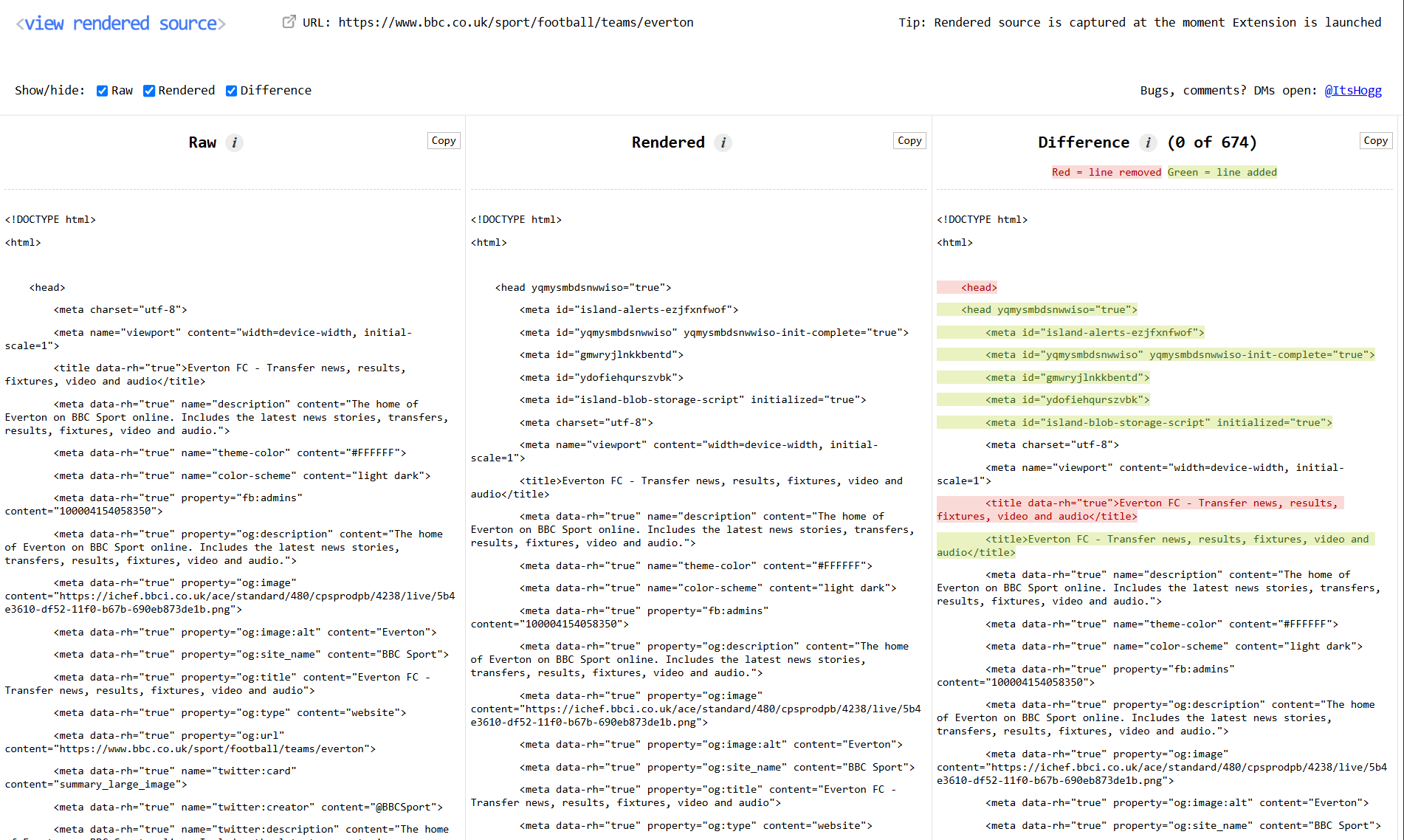
The old View Rendered Source viewer (v4) showing Raw, Rendered and Difference panels on a BBC Sport page
Old
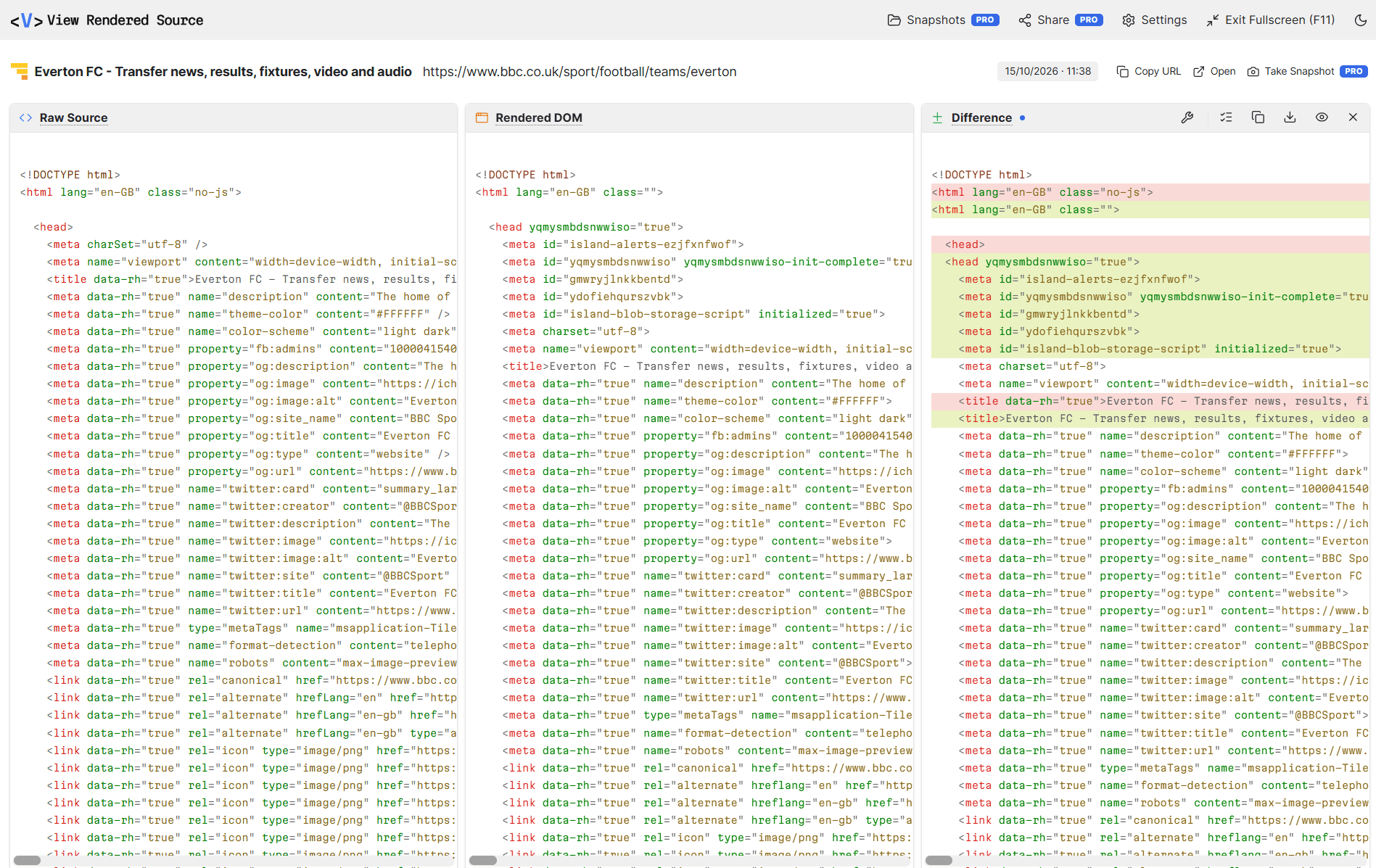
The new View Rendered Source viewer (v5.0) showing Raw Source, Rendered DOM and Difference panels on a BBC Sport page
New (Light Mode)
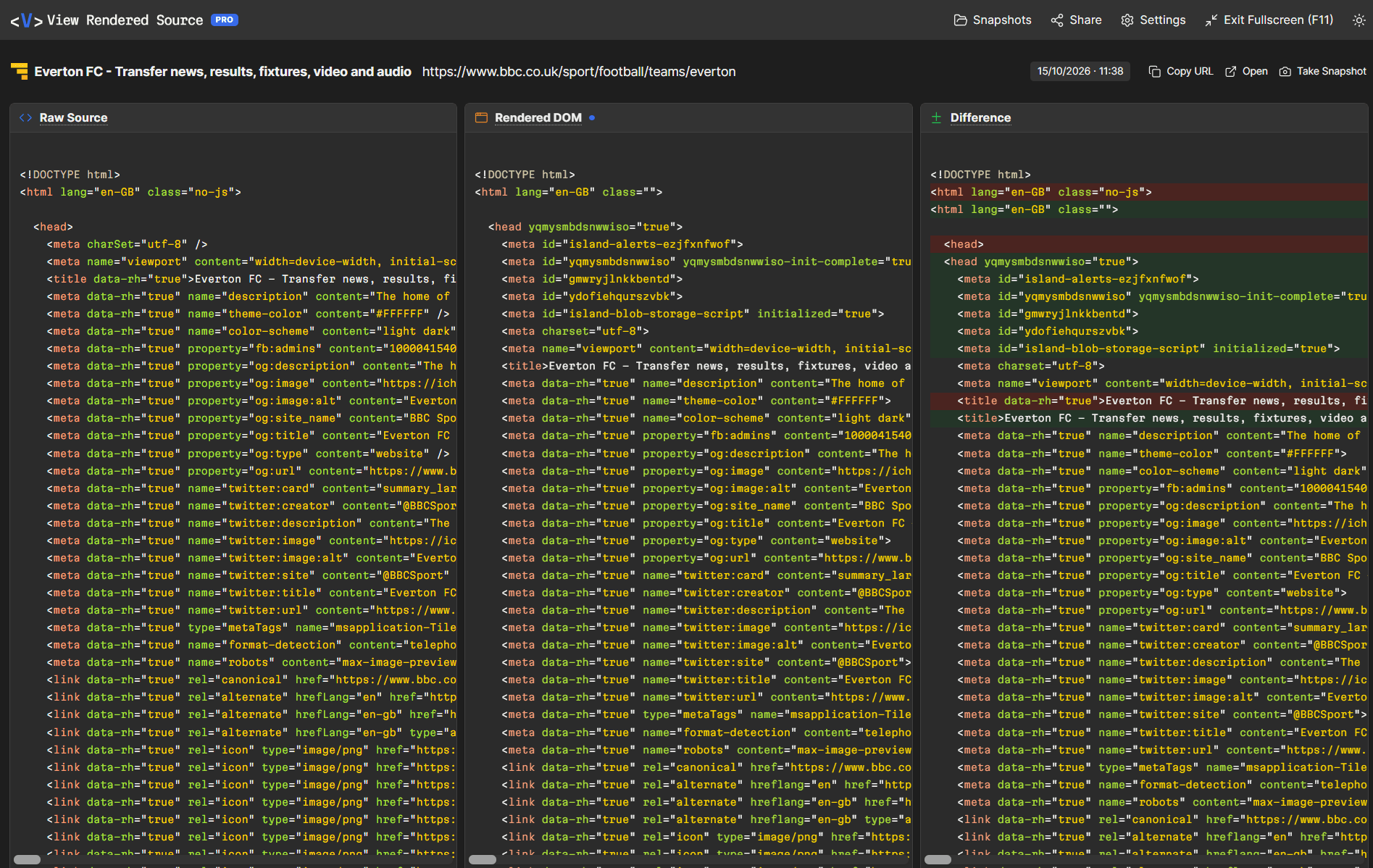
The new View Rendered Source viewer (v5.0) in dark mode on a BBC Sport page
New (Dark Mode)

New goodies

Try the demos below.

SEO filter

One click in the Difference panel shows only the tags search engines care about: titles, headings, meta description and robots, canonical, hreflang and JSON-LD. See if JavaScript hides or breaks them.

Or filter by All, Changes, Added or Removed, and step through each change with a running count.

Difference
<head> <title>Trail Runner Shoes | Northpeak</title> <title>Northpeak | Home</title> <link rel="canonical" href="https://northpeak.com/trail-runner"> <link rel="canonical" href="https://northpeak.com/"> <link rel="stylesheet" href="/app.css"> <script src="https://chat.example/widget.js"></script> </head> <h1>Trail Runner</h1> <div class="loading"></div>

Inventory

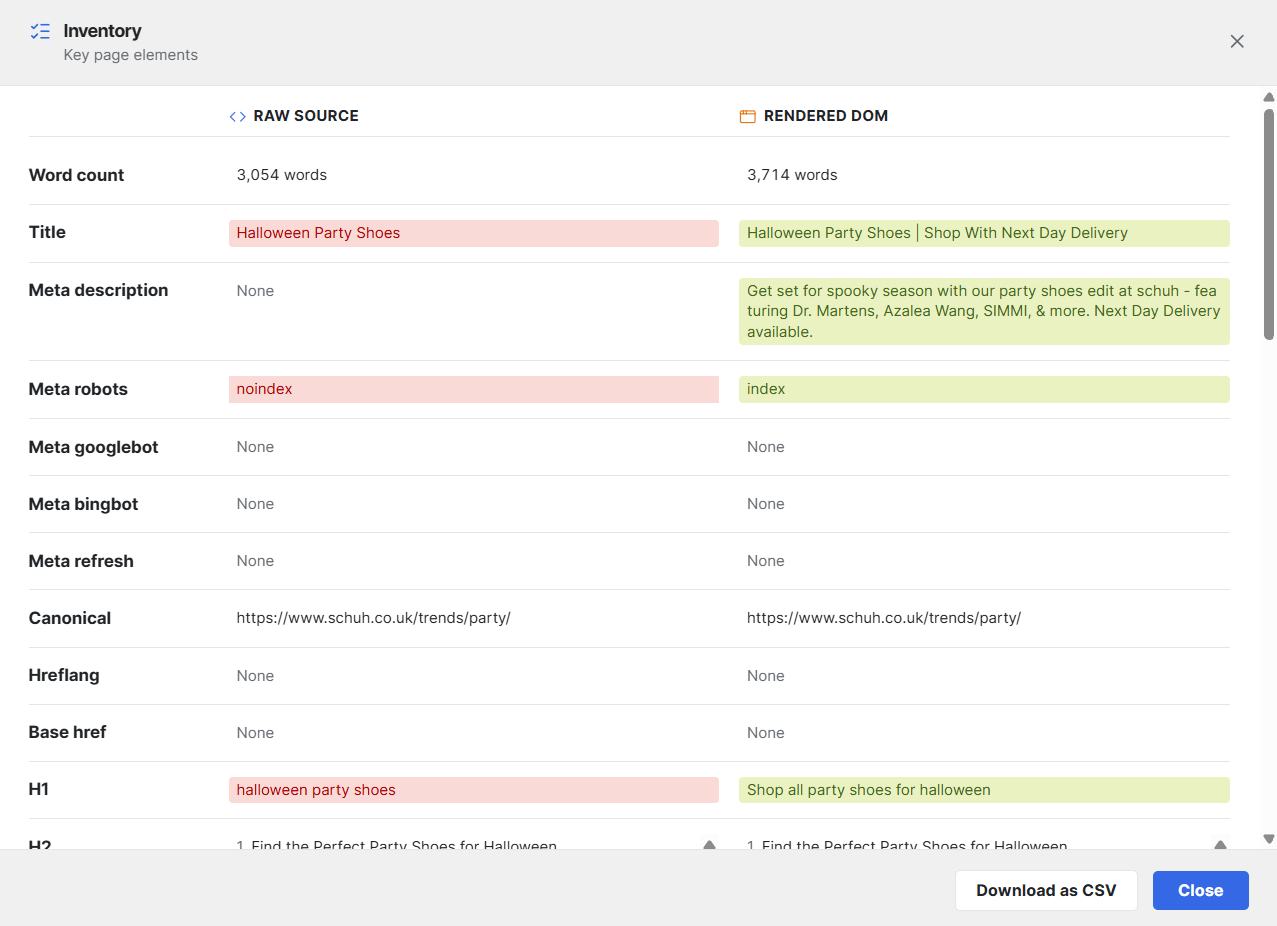
A side-by-side list of the key page elements in the Raw Source and the Rendered DOM. Spot what's missing or different without reading every line. Access it from the Difference panel.

Inventory: Raw Source and Rendered DOM values for key SEO elements, side by side

Let there be dark!

Maybe the most requested feature. Move across the panel to compare.

Rendered DOMLight
<!DOCTYPE html> <html lang="en"> <head> <meta charset="utf-8"> <title>Trail Runner Shoes | Northpeak</title> <meta name="description" content="Lightweight trail shoes with free delivery."> <link rel="canonical" href="https://northpeak.com/trail-runner"> </head>

Syntax highlighting

Color, finally! Color-coded HTML so tags, attributes and values are quick to scan. Turn it off below to see the difference. Highlighting is skipped on long pages to avoid hang.

<nav class="site-nav" aria-label="Main"> <a href="/shoes" class="nav-link">Shoes</a> <a href="/sale" class="nav-link is-sale">Sale</a> <img src="/logo.svg" alt="Northpeak" width="120"> </nav>
Find for every panel

Search Raw, Rendered or Difference with live highlights and a match count. Ctrl/Cmd+F opens Find only on the panel you're in, which works better than the browser's native Find.

0/0
<link rel="canonical" href="https://northpeak.com/"> <meta name="robots" content="index, follow"> <link rel="alternate" hreflang="en-gb" href="https://northpeak.com/"> <!-- canonical set by app.js --> <link rel="canonical" href="https://northpeak.com/trail-runner">

Wrap or scroll

Wrapping was on and made the page feel longer than it was. Wrap long lines, or scroll sideways with a scrollbar that stays in view on long pages. Also: code font size and fullscreen mode.

<script type="application/ld+json"> {"@context":"https://schema.org","@type":"Product","name":"Trail Runner","brand":{"@type":"Brand","name":"Northpeak"},"offers":{"@type":"Offer","price":"120.00","priceCurrency":"GBP","availability":"https://schema.org/InStock"}} </script>

Diff options

False differences are gone. Ignore case, and treat <img> and <img /> as the same. You can also set how long to wait for diffing on very large pages.

<div class="product"> <BUTTON type="submit">Add to basket</BUTTON> <button type="submit">Add to basket</button> <img src="/shoe.jpg" alt="Trail Runner" /> <img src="/shoe.jpg" alt="Trail Runner"> <p class="stock">Only 3 left</p> </div>

Download as .txt

Save a dated, named .txt file of any panel. Diffs use +/- markers. When the diff is filtered, you can export just what you see or the full diff.

vrs_diff_https~northpeak.com~trail-runner_2026-10-30.txt

-    <title>Trail Runner Shoes | Northpeak</title>
+    <title>Northpeak | Home</title>
-    <link rel="canonical" href="https://northpeak.com/trail-runner">
+    <link rel="canonical" href="https://northpeak.com/">

Settings

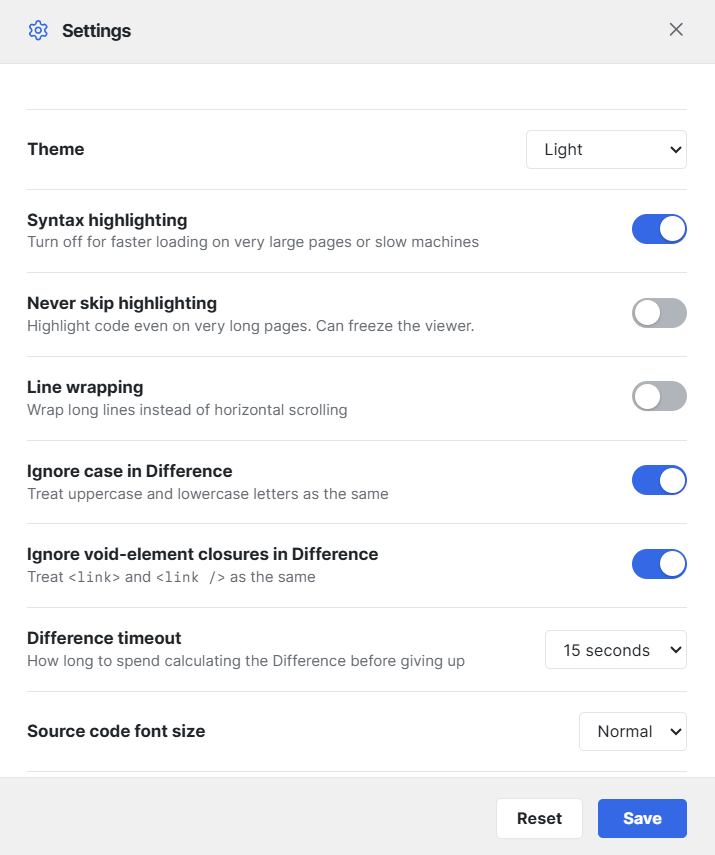
Theme, highlighting, wrapping, diff options, timeout and font size. Set them once and they're remembered.

Settings: theme, syntax highlighting, line wrapping, diff options, timeout and font size

Pro

Snapshots, compare and share links

Upgrade to Pro to save a Snapshot of a page's raw, rendered and diffed source to view another time. After a release or a migration, take another and compare with the old version. Share a public link with your team, client or boss.

Pro

Take a Snapshot

Save the raw, rendered and diffed source to your account, with the capture date and an optional private note (like "Before CMS migration Oct 2026").

Pro

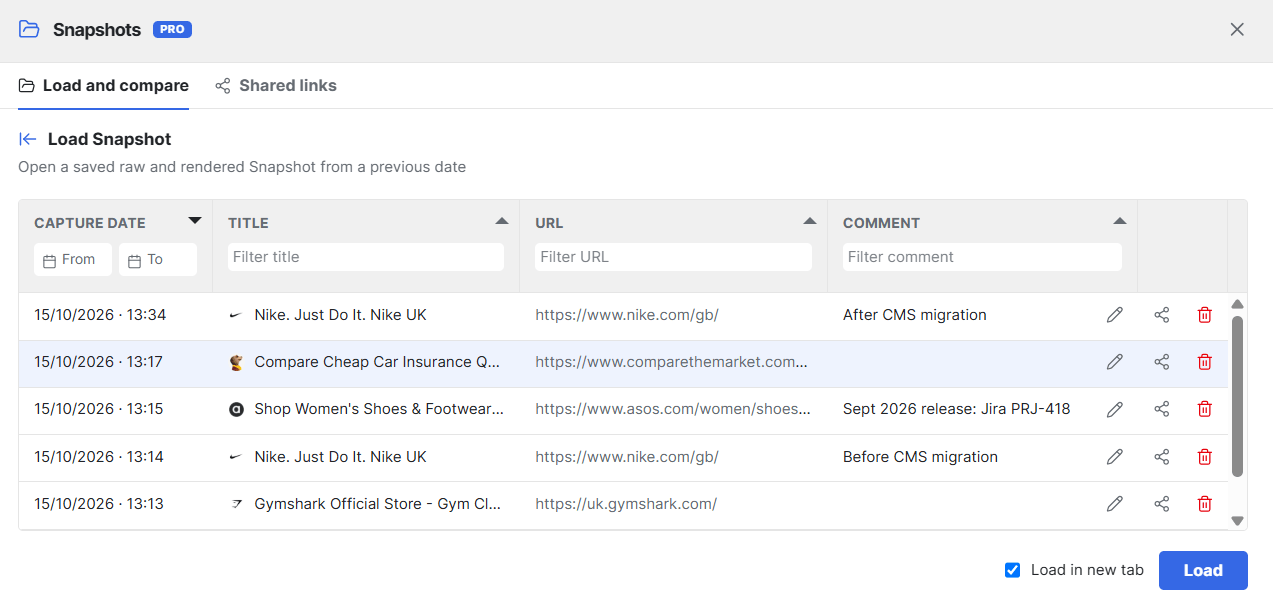
Snapshots library

Browse and filter by date, title, URL or note. Reopen, edit or delete any Snapshot.

Pro

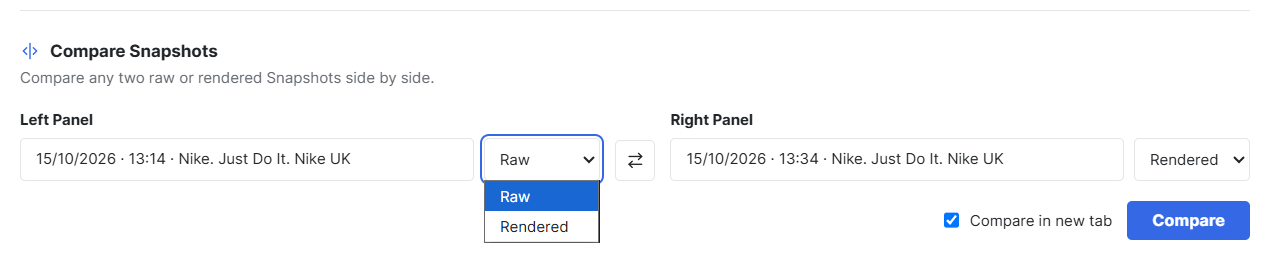
Compare any two

Diff two Snapshots across dates, or across pages like staging and production.

Pro

Share a public link

Anyone can open it, no extension needed. Not indexed by search engines. Any note you added stays private.

Snapshots library: a table of saved Snapshots with capture date, title, URL and comment filters
Compare Snapshots: pick a Snapshot and Raw or Rendered for the left and right panels

Pro is $12 a month, or $120 a year (two months free). Try it free for 7 days. Buying for a team? Save 5% on 4 or more licenses, and 10% on 11 or more.

See Pro pricing

Easier to use

The whole viewer was rebuilt. Here's what you'll notice.

  • Collapse, close or focus any panel

    Quickly isolate one panel in one click. Your layout is remembered for next time.

  • Keeps working if you close the original page

    Before, closing the original tab gave an error and you had to start again. Now you can close or refresh it, or reload the viewer, and it keeps what it already captured.

  • Clear errors with a retry

    Better error messages for timeouts, network problems and Cloudflare blocks, with one-click retry.

  • Faster on big pages

    The diff runs in the background and long pages now render in the browser in chunks, so the viewer stays responsive.

  • Jump between changes

    Step through each change in the Difference panel, and use Enter or the arrow keys to move through Find results.

And some small bug fixes

Thanks for using View Rendered Source and all the kind words so far. I hope you love this update.

Jon

Already installed? You'll update automatically.

Add to Chrome, it's free